



Skip to content

+

Already a member with a qualified checking account? Here’s how to open your Bits of Stock brokerage account

In this step-by-step guide, we will help you navigate how to open up your eligible brokerage account.

1.

If you are already a member and have a checking account with Cardinal Credit Union and you are 18-28 years old, log into online banking. If you do not have an online banking account, click on the “Enroll” button to get started.

2.

Once logged into online banking, navigate to the “Stock Rewards” menu tab on the top navigation bar.

3.

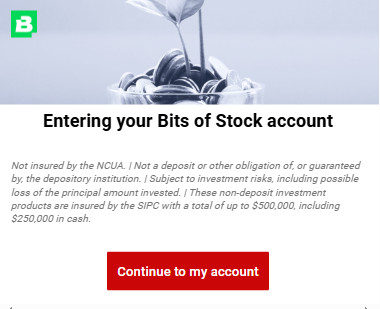
After clicking on “Stock Rewards,” you will see this screen – “Entering Your Bit of Stock account.”

Click on “Continue to my account” button.

4.

Lastly, set up your brokerage account and pick your initial stock to start earning Stock Rewards. Don’t forget to create your brokerage account to receive the $10 sign-on bonus!

Back To Top